Industry

Travel & Hospitality

Client

Independent Project
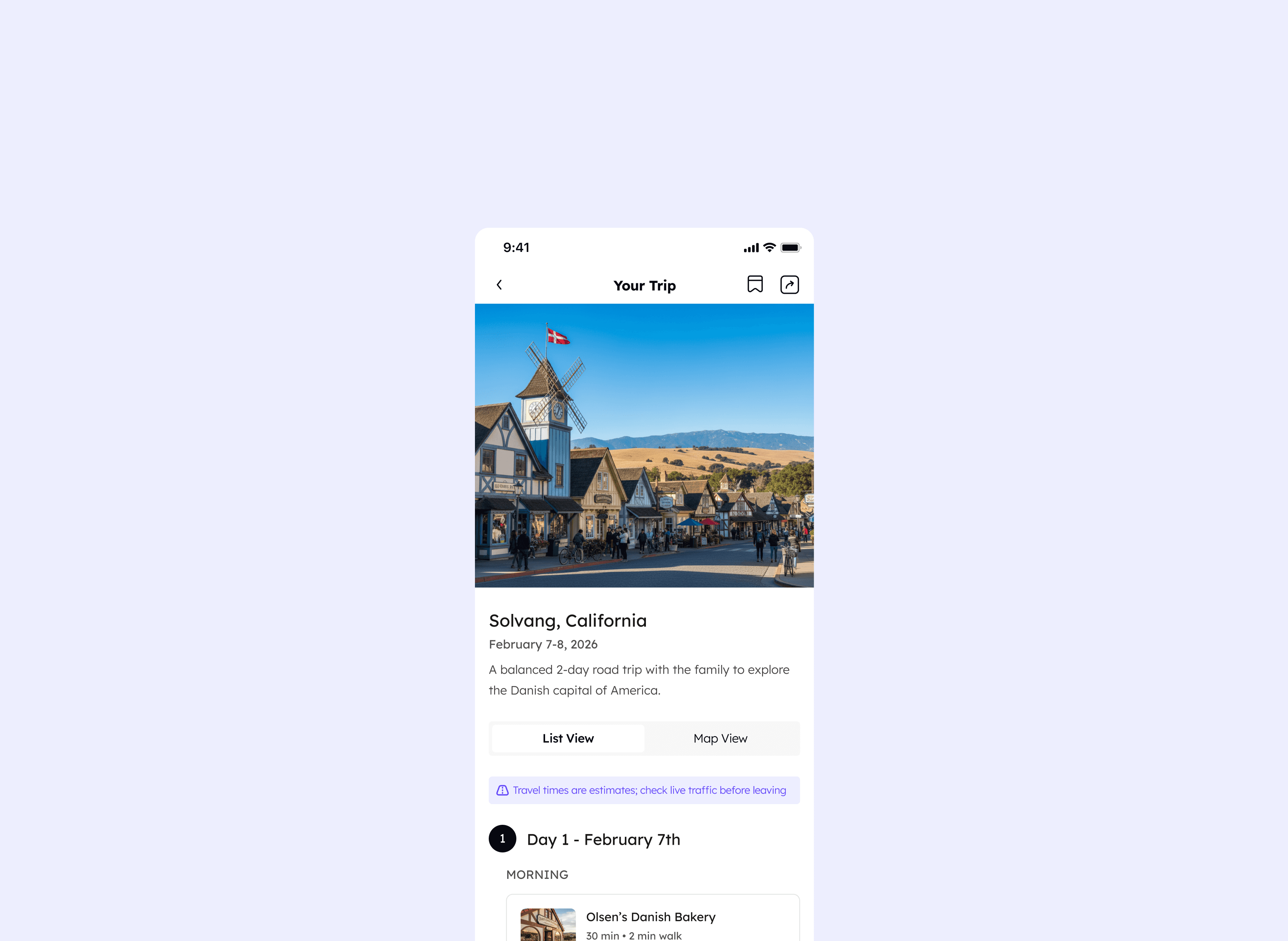
AI Trip Copilot - Designing with AI, for AI

AI Trip Copilot - Designing with AI, for AI

What Can AI Actually Do for a UX Designer?

What Can AI Actually Do for a UX Designer?

AI in UX design is one of the most talked-about shifts in the industry right now, but talking about it and actually testing it are two different things. I wanted to find out for myself: how well can generative AI support a real UX project? Which phases of the design process does it genuinely accelerate, and where does it fall short? Can a designer go from zero to a working, interactive product in a matter of days?

So I gave myself a challenge: four days, AI-assisted from start to finish, a real problem worth solving. I chose travel planning because it's a space with genuine friction, enough familiarity to move fast, and a natural fit for what AI does well: synthesis, personalization, and handling complexity.

The project became two things at once: a travel product worth designing, and a live experiment in what AI can and can't do for a UX designer.

AI in UX design is one of the most talked-about shifts in the industry right now, but talking about it and actually testing it are two different things. I wanted to find out for myself: how well can generative AI support a real UX project? Which phases of the design process does it genuinely accelerate, and where does it fall short? Can a designer go from zero to a working, interactive product in a matter of days?

So I gave myself a challenge: four days, AI-assisted from start to finish, a real problem worth solving. I chose travel planning because it's a space with genuine friction, enough familiarity to move fast, and a natural fit for what AI does well: synthesis, personalization, and handling complexity.

The project became two things at once: a travel product worth designing, and a live experiment in what AI can and can't do for a UX designer.

ROLE

Solo Designer

Solo Designer

RESPONSIBILITIES

AI-assisted end-to-end UX/UI design process

AI-assisted end-to-end UX/UI design process

COLLABORATORS

Independent project

Independent project

TIMELINE

2026 - 4 days

2026 - 4 days

The experiment

Exploring AI in the UX Workflow
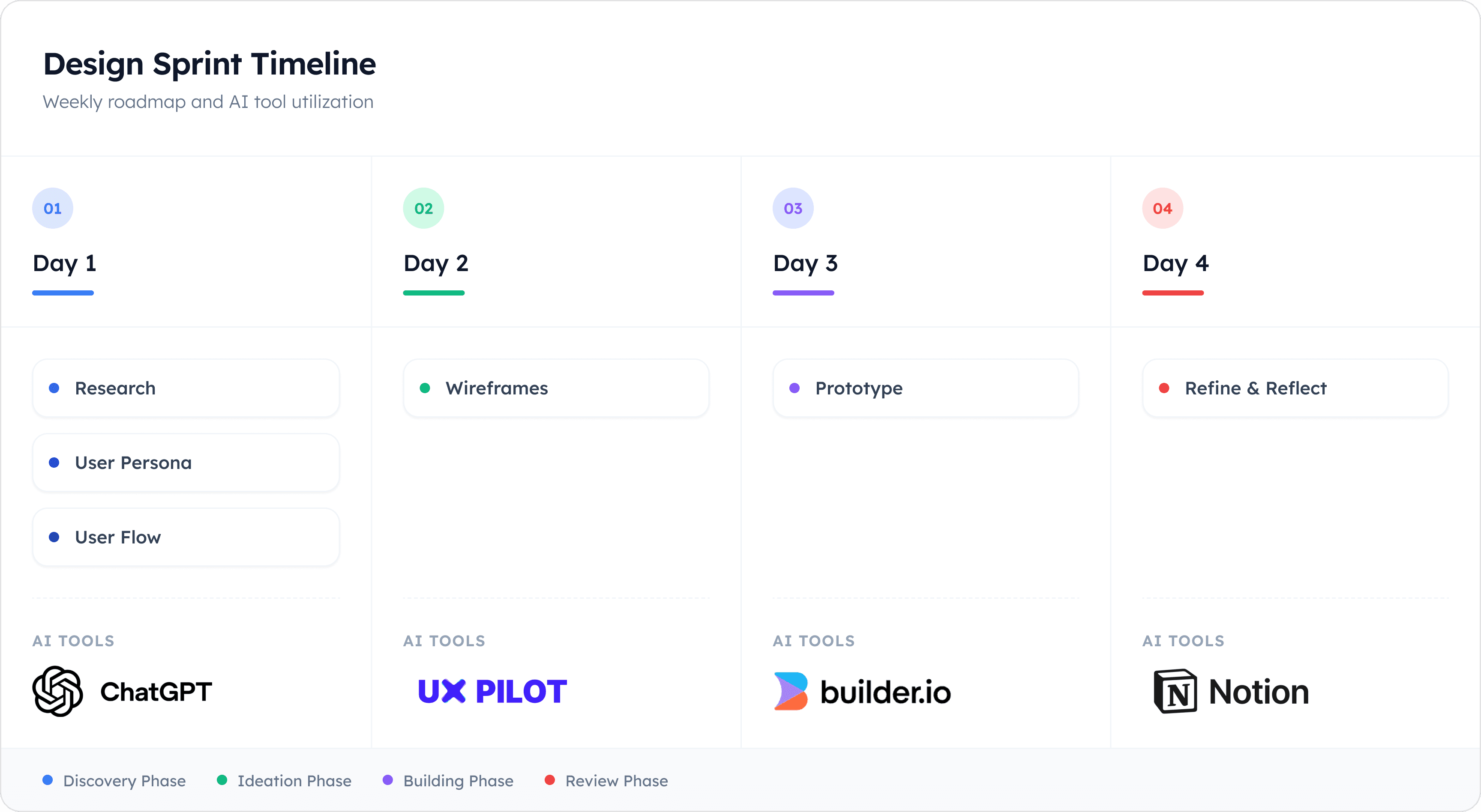
During a 4 day sprint, I applied a range of AI tools through each phase of the design process to learn how and where AI can meaningfully augment my work.

During a 4 day sprint, I applied a range of AI tools through each phase of the design process to learn how and where AI can meaningfully augment my work.

Understanding the problem

Fragmented Travel Planning

Planning a trip today is deceptively hard. The information exists, but it's scattered across Google, TripAdvisor, travel blogs, airline apps, booking platforms, and Reddit threads. You're constantly switching contexts, copying things into notes apps, and trying to hold a mental model of a trip that changes the moment a flight price shifts or a restaurant turns out to be closed on Tuesdays.

What's missing isn't information, it's synthesis. And more than that: personalization. Generic itineraries don't account for your pace of travel, your budget, how much you walk, whether you have kids in tow, or that you'd rather spend three hours in one museum than sprint through five. The web gives you options. It doesn't give you your trip.

Planning a trip today is deceptively hard. The information exists, but it's scattered across Google, TripAdvisor, travel blogs, airline apps, booking platforms, and Reddit threads. You're constantly switching contexts, copying things into notes apps, and trying to hold a mental model of a trip that changes the moment a flight price shifts or a restaurant turns out to be closed on Tuesdays.

What's missing isn't information, it's synthesis. And more than that: personalization. Generic itineraries don't account for your pace of travel, your budget, how much you walk, whether you have kids in tow, or that you'd rather spend three hours in one museum than sprint through five. The web gives you options. It doesn't give you your trip.

What if an AI could take your specific constraints and preferences and build a trip around you, and then let you actually shape it?

What if an AI could take your specific constraints and preferences and build a trip around you, and then let you actually shape it?

Day 1: Research & insights

What Travelers Actually Deal With

On Day 1 of the sprint, I turned to ChatGPT as a research accelerator, asking it to synthesize the most common and interesting problems people face when planning trips.

On Day 1 of the sprint, I turned to ChatGPT as a research accelerator, asking it to synthesize the most common and interesting problems people face when planning trips.

Prompt: What do you know about traveler struggles?

The output was immediate and comprehensive, pulling from patterns across consumer research, travel forums, and product reviews.

The output was immediate and comprehensive, pulling from patterns across consumer research, travel forums, and product reviews.

This surfaced ten distinct pain point categories, but a few themes stood out as most relevant to the design direction:

This surfaced ten distinct pain point categories, but a few themes stood out as most relevant to the design direction:

01

Information overload

The real problem is curation and confidence, not discovery. Forty open browser tabs is a symptom of a broken experience.

02

Lacking personalization

Most travel tools optimize for popularity, not fit. "Top 10 things to do" lists ignore pace preference, energy level, etc.

03

Static itineraries

When something changes like a closure, delay, budget shift, most tools leave users starting over. There's no adaptability built in.

04

AI-generated itineraries feel generic

Even as AI travel tools emerge, users report that AI outputs feel unrealistic, over-optimized, and emotionally flat.

These insights shaped two clear goals going into the sprint.

These insights shaped two clear goals going into the sprint.

What I set out to do

Goals

This project had two parallel goals: one about the process, and one about the product.

This project had two parallel goals: one about the process, and one about the product.

Process

Prove AI can accelerate a UX sprint

Test whether AI tools could take a designer from research and wireframing through to a working interactive prototype, without sacrificing design quality or thinking.

Product

Build a travel experience that's personal

Design a travel planning app that adapts to the individual traveler's unique constraints and preferences, unified enough that they'd never need to leave to plan their trip.

Day 2: The wireframe

From Sketch to AI-Generated Wireframe
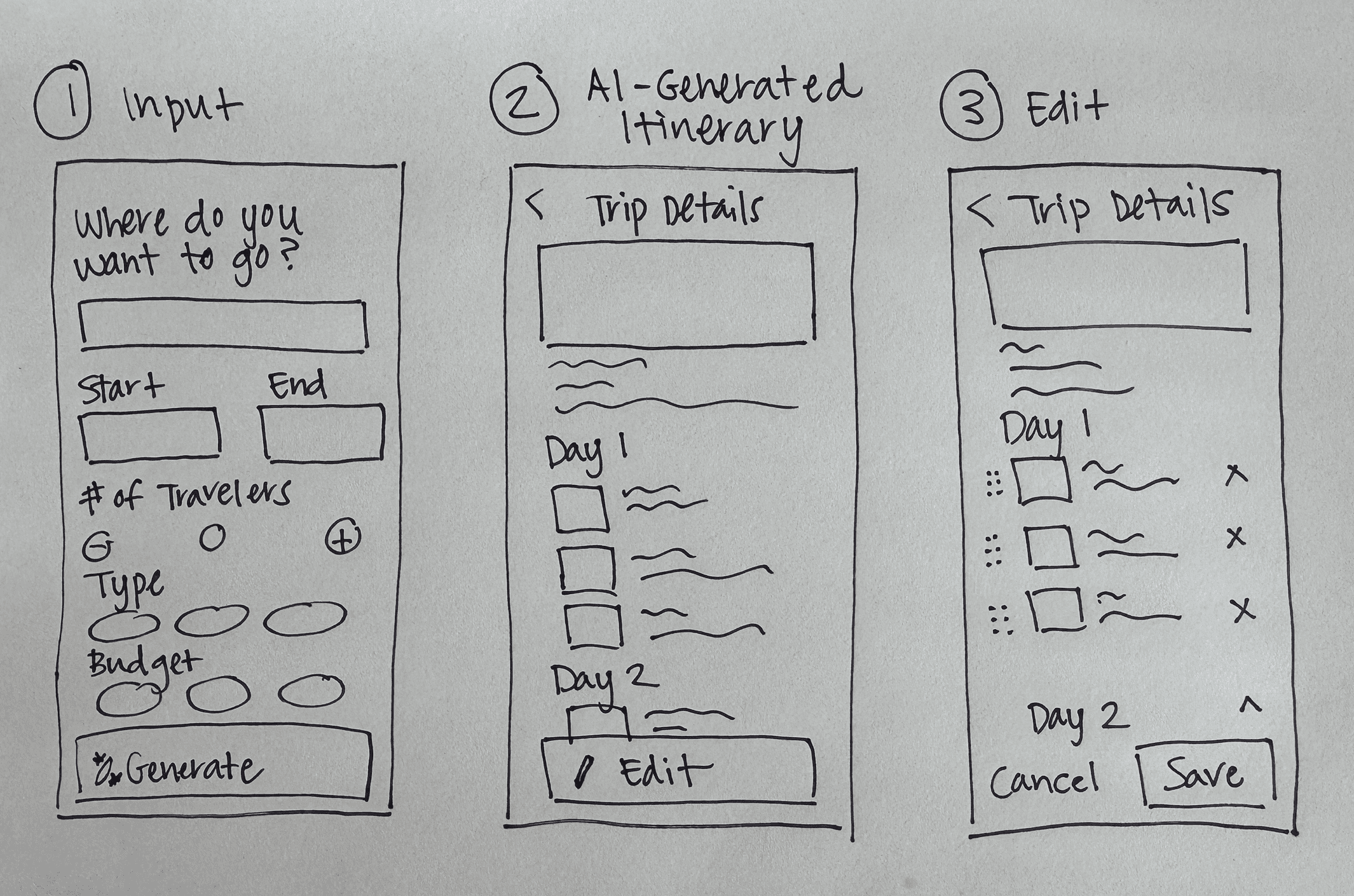
After completing my research, I sketched a simple user flow on paper to map out the core screens. On Day 2, I uploaded the sketches into Visily and UX Pilot. Both produced usable wireframe outputs almost instantly, and with a few follow-up prompts I was able to refine them toward the structure I needed.

After completing my research, I sketched a simple user flow on paper to map out the core screens. On Day 2, I uploaded the sketches into Visily and UX Pilot. Both produced usable wireframe outputs almost instantly, and with a few follow-up prompts I was able to refine them toward the structure I needed.

Understanding AI UX

Breaking Down AI Patterns

Before jumping into design, I researched how AI-powered experiences should actually behave. Integrating AI with maps, scheduling, and personal constraints introduced unique UX challenges especially around trust, control, and making AI feel intuitive rather than overwhelming. Four principles became the foundation for every design decision that followed.

Before jumping into design, I researched how AI-powered experiences should actually behave. Integrating AI with maps, scheduling, and personal constraints introduced unique UX challenges especially around trust, control, and making AI feel intuitive rather than overwhelming. Four principles became the foundation for every design decision that followed.

1

Trust & transparency

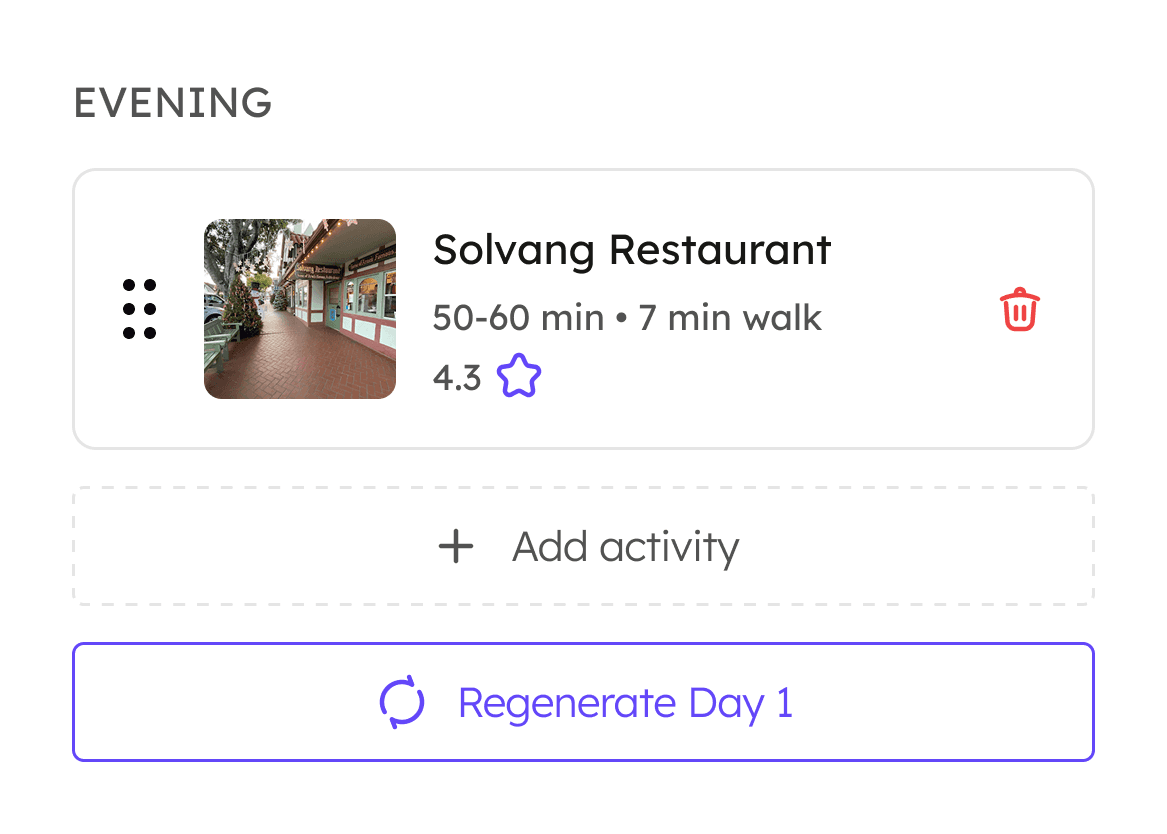
Show users why the AI suggested something: ratings, distance, opening hours, and duration so recommendations feel reasoned, not random.

2

User control

Provide clear ways to override AI suggestions, undo changes, and fall back to manual editing. NN/g and UX Planet both cite this as a core best practice.
3

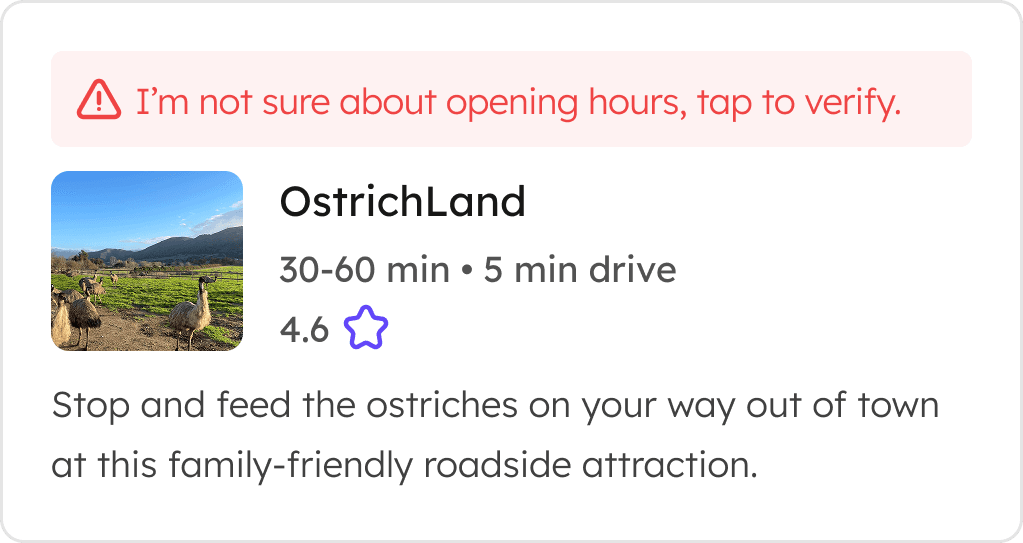
Handling errors & uncertainty

Design for failure states: what happens when the AI fails, data isn't available, or a destination is unknown. Uncertainty should be surfaced, not hidden.
4

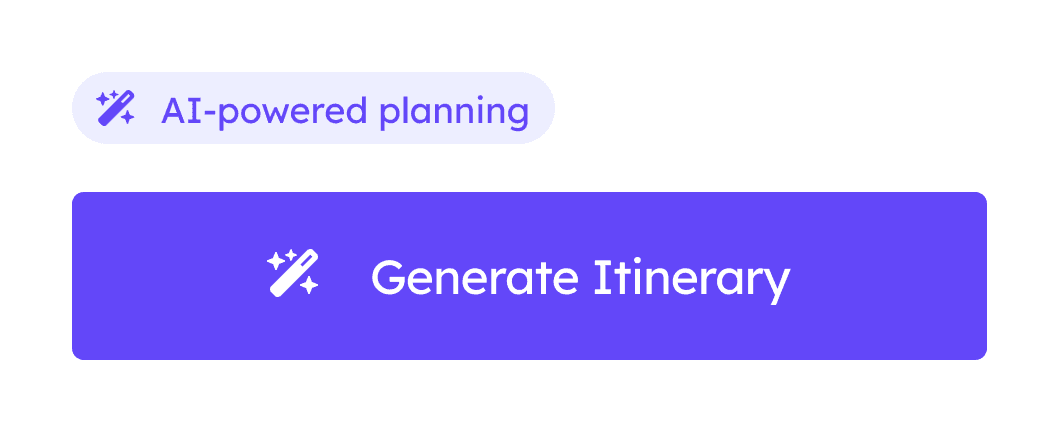
Discoverability

Help users find AI features naturally without the AI taking over the whole experience. AI should feel like an enhancement, not a takeover.
Sources: shapeofai.com, nngroup.com

Personalization Before Generation

Most travel apps start with a search bar. This one starts with you. Before the AI generates anything, it collects the inputs that make a trip actually yours: destination, dates, trip type, budget, pace, and any specific needs. The more context the AI has, the less generic the output.

Most travel apps start with a search bar. This one starts with you. Before the AI generates anything, it collects the inputs that make a trip actually yours: destination, dates, trip type, budget, pace, and any specific needs. The more context the AI has, the less generic the output.

From Inputs to Itinerary

Once the AI has what it needs, it generates a full day-by-day plan structured by morning, afternoon, and evening, with travel times, ratings, and a trip summary baked in. The result feels less like a search result and more like a recommendation from someone who actually read your preferences.

Once the AI has what it needs, it generates a full day-by-day plan structured by morning, afternoon, and evening, with travel times, ratings, and a trip summary baked in. The result feels less like a search result and more like a recommendation from someone who actually read your preferences.

Editable by Design

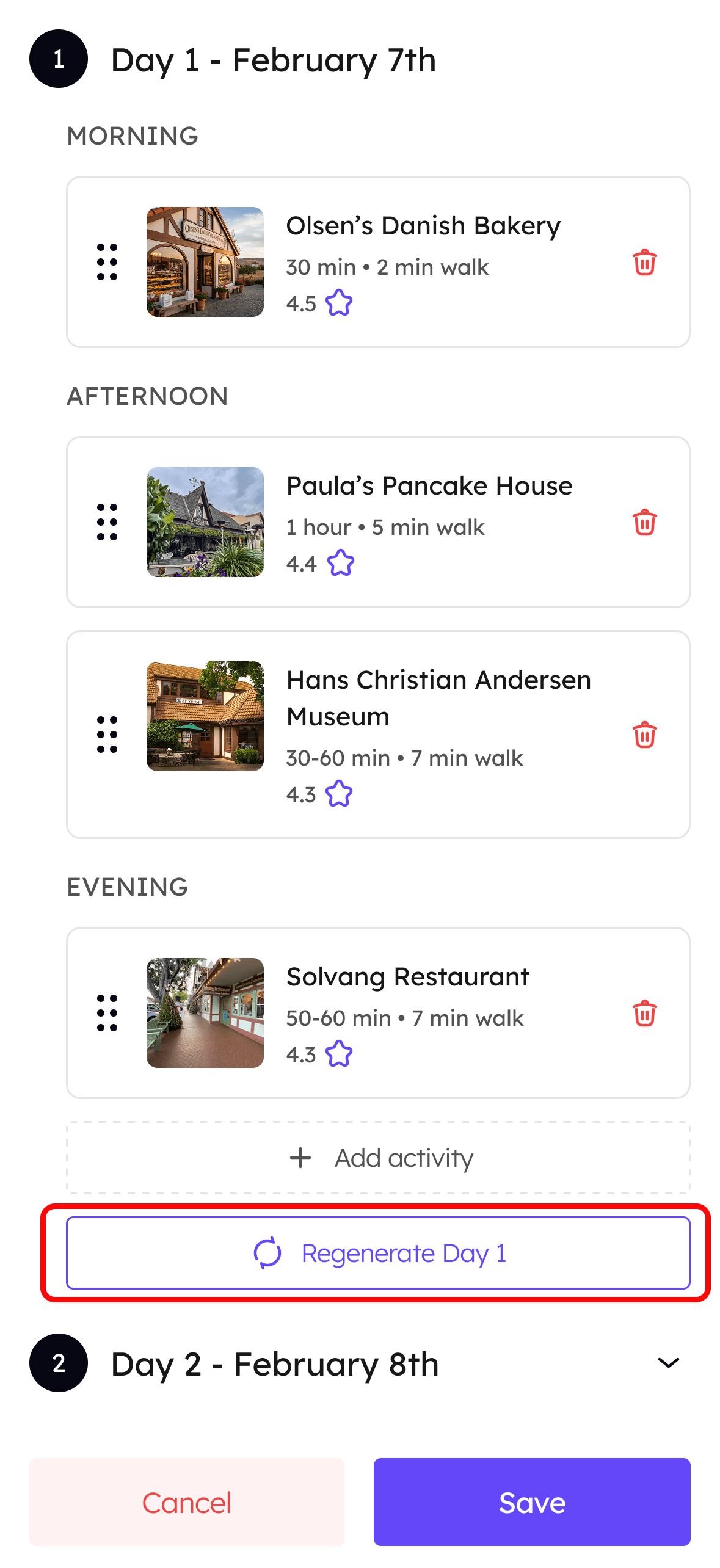
The edit view puts control back in the user's hands with simple, familiar interactions: drag to reorder, tap to remove, add an activity, or regenerate just one day. Every modification is scoped and reversible, so users can experiment without fear of losing what they already like.

The edit view puts control back in the user's hands with simple, familiar interactions: drag to reorder, tap to remove, add an activity, or regenerate just one day. Every modification is scoped and reversible, so users can experiment without fear of losing what they already like.

Design decision

Regenerate Should Be Contextual, Not Blind

The initial wireframes generated by Visily placed "Regenerate" as a global button on the Itinerary page. On the surface it made sense. But thinking through the user's mental model made the problem clear: a traveler who has spent time editing Day 1 exactly how they want it doesn't want to risk losing that work just to fix something on Day 2. One button shouldn't have the power to undo everything the user carefully put together.

This was one of the clearest moments in the project where AI got it directionally right but contextually wrong and where designer judgment had to step in.

The solution: Move Regenerate inside the edit interface, scoped to a single day. The user's action and the AI's response are now directly linked: edit Day 2, regenerate Day 2. Everything else stays untouched.

Why it matters: This interaction pattern reflects a broader principle for AI product design: AI should do what the user asked, nothing more. Scoping AI actions to the user's intent builds trust and reduces the anxiety of "what will this change?"

The initial wireframes generated by Visily placed "Regenerate" as a global button on the Itinerary page. On the surface it made sense. But thinking through the user's mental model made the problem clear: a traveler who has spent time editing Day 1 exactly how they want it doesn't want to risk losing that work just to fix something on Day 2. One button shouldn't have the power to undo everything the user carefully put together.

This was one of the clearest moments in the project where AI got it directionally right but contextually wrong and where designer judgment had to step in.

The solution: Move Regenerate inside the edit interface, scoped to a single day. The user's action and the AI's response are now directly linked: edit Day 2, regenerate Day 2. Everything else stays untouched.

Why it matters: This interaction pattern reflects a broader principle for AI product design: AI should do what the user asked, nothing more. Scoping AI actions to the user's intent builds trust and reduces the anxiety of "what will this change?"

The initial wireframes generated by Visily placed "Regenerate" as a global button on the Itinerary page. On the surface it made sense. But thinking through the user's mental model made the problem clear: a traveler who has spent time editing Day 1 exactly how they want it doesn't want to risk losing that work just to fix something on Day 2. One button shouldn't have the power to undo everything the user carefully put together.

This was one of the clearest moments in the project where AI got it directionally right but contextually wrong and where designer judgment had to step in.

The solution: Move Regenerate inside the edit interface, scoped to a single day. The user's action and the AI's response are now directly linked: edit Day 2, regenerate Day 2. Everything else stays untouched.

Why it matters: This interaction pattern reflects a broader principle for AI product design: AI should do what the user asked, nothing more. Scoping AI actions to the user's intent builds trust and reduces the anxiety of "what will this change?"

BEFORE

Global "regenerate" on itinerary page

One button regenerates the entire trip, including days the user already likes.
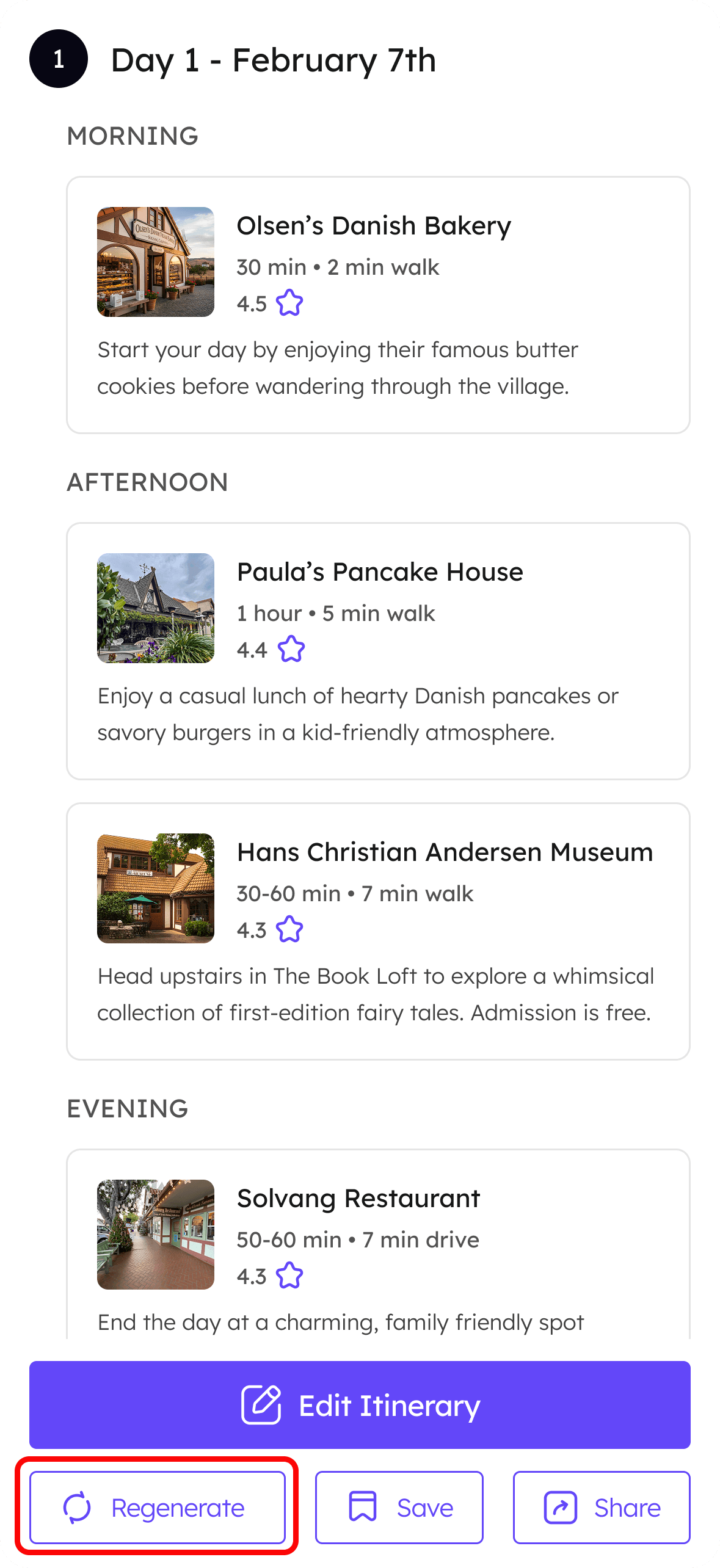
AFTER

Contextual "regenerate" inside edit view

Regenerate is scoped to one day, only what the user is actively editing changes.
Day 3: The build

From Design to Working Prototype

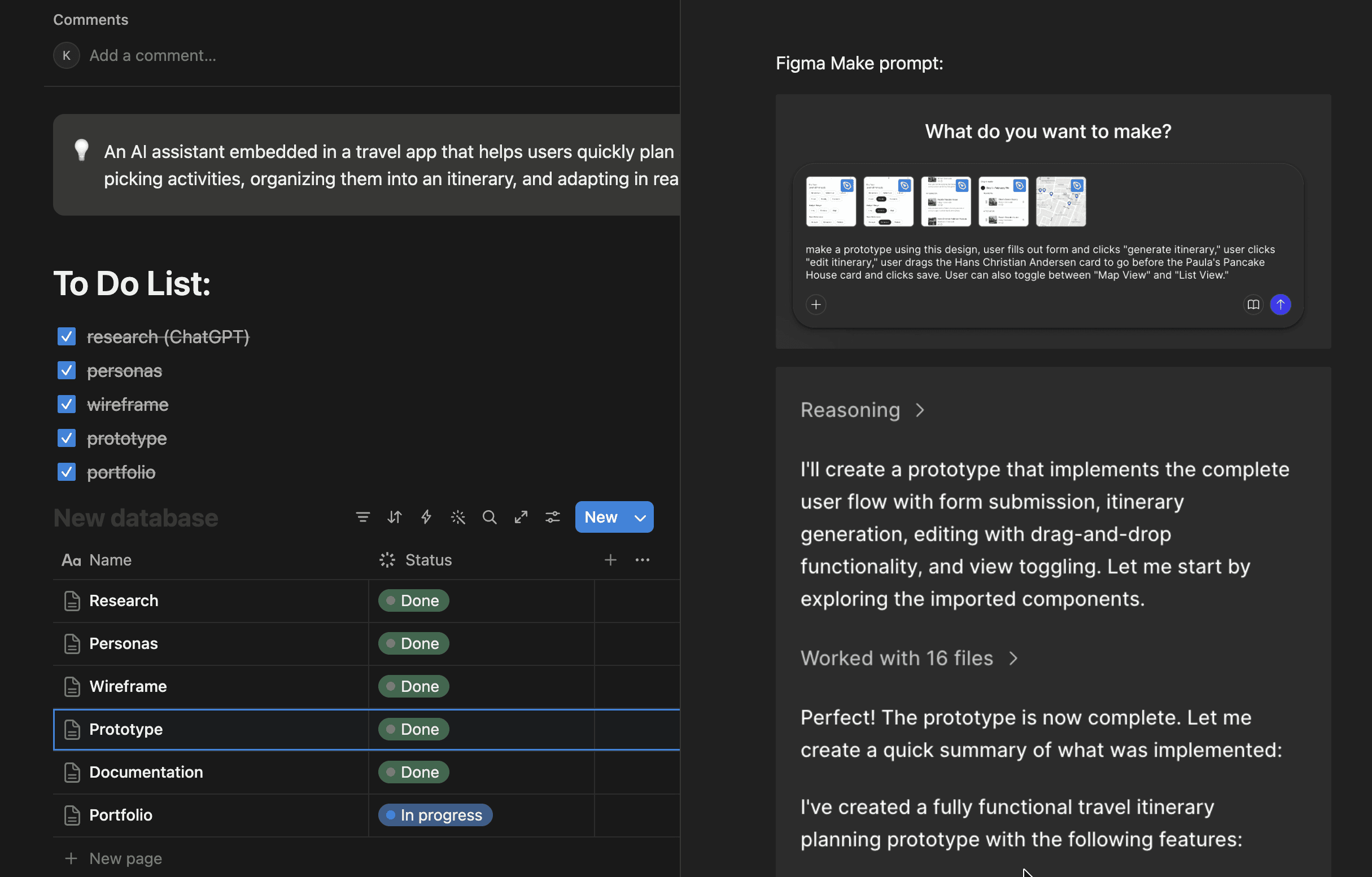
With wireframes done, Day 3 was about bringing the app to life. I tested two AI prototyping tools to see which could best translate my Figma designs into a working product.

Figma Make was the natural first choice as a built-in Figma feature, but it fell short. Multiple generated versions had hallucinations: missing data on cards, incorrect icons, buttons that had been deleted from the design reappearing, and wrong images.

Builder.io was a different story. I prompted it with my Figma designs and within minutes it had generated a working prototype that accurately matched the UI including the drag-and-drop interactions on the edit view.

The takeaway: not all AI prototyping tools are equal. Speed matters, but accuracy matters more.

With wireframes done, Day 3 was about bringing the app to life. I tested two AI prototyping tools to see which could best translate my Figma designs into a working product.

Figma Make was the natural first choice as a built-in Figma feature, but it fell short. Multiple generated versions had hallucinations: missing data on cards, incorrect icons, buttons that had been deleted from the design reappearing, and wrong images.

Builder.io was a different story. I prompted it with my Figma designs and within minutes it had generated a working prototype that accurately matched the UI including the drag-and-drop interactions on the edit view.

The takeaway: not all AI prototyping tools are equal. Speed matters, but accuracy matters more.

With wireframes done, Day 3 was about bringing the app to life. I tested two AI prototyping tools to see which could best translate my Figma designs into a working product.

Figma Make was the natural first choice as a built-in Figma feature, but it fell short. Multiple generated versions had hallucinations: missing data on cards, incorrect icons, buttons that had been deleted from the design reappearing, and wrong images.

Builder.io was a different story. I prompted it with my Figma designs and within minutes it had generated a working prototype that accurately matched the UI including the drag-and-drop interactions on the edit view.

The takeaway: not all AI prototyping tools are equal. Speed matters, but accuracy matters more.

Day 4: Wrap up

Closing the Loop

The final day was spent stepping back. I documented my findings in Notion: what worked, what didn't, and what I'd do differently with more time.

The final day was spent stepping back. I documented my findings in Notion: what worked, what didn't, and what I'd do differently with more time.

The final day was spent stepping back. I documented my findings in Notion: what worked, what didn't, and what I'd do differently with more time.

Impact

In 4 days, I went from a blank canvas to a concept with working interactions. The project proved that AI tools can meaningfully compress a design sprint without sacrificing thinking quality. More importantly, it clarified where AI genuinely helps and where the designer still has to lead.

Reflections

What I Learned from this Project

AI accelerates, designers decide

The fastest moments were ideation and wireframing. The most important moments were knowing when to override what the AI produced.

Control is a feature, not an afterthought

Users want AI to do the heavy lifting but they need to feel like they can course-correct at any point.

Personalization only works with the right inputs

The quality of an AI-generated itinerary is directly tied to what you ask for. Designing the form was just as important as designing the output.

AI output is a starting point, not a solution

Every screen the AI generated needed designer judgment to become usable. The best role for AI in a UX process is first draft, not final answer.

Create a free website with Framer, the website builder loved by startups, designers and agencies.